Home / Planaro Calendar
Planaro Calendar

Find a time that works for everyone

Skip the back-and-forth about availability. See your whole week, busy hours, open time slots and events from your work calendars. Select a time to create a meeting with its own room.

Why is this necessary?

From an open time slot to a conversation

See available times at a glance

See busy periods and open slots across the week, then find time for a conversation.

Schedule a meeting with one gesture

Select a time in the calendar to create an event, a meeting room and a link ready to share.

Your work calendars, together

See Google, Yandex and Outlook events in the same view through iCal subscriptions, without giving Planaro access to your account.
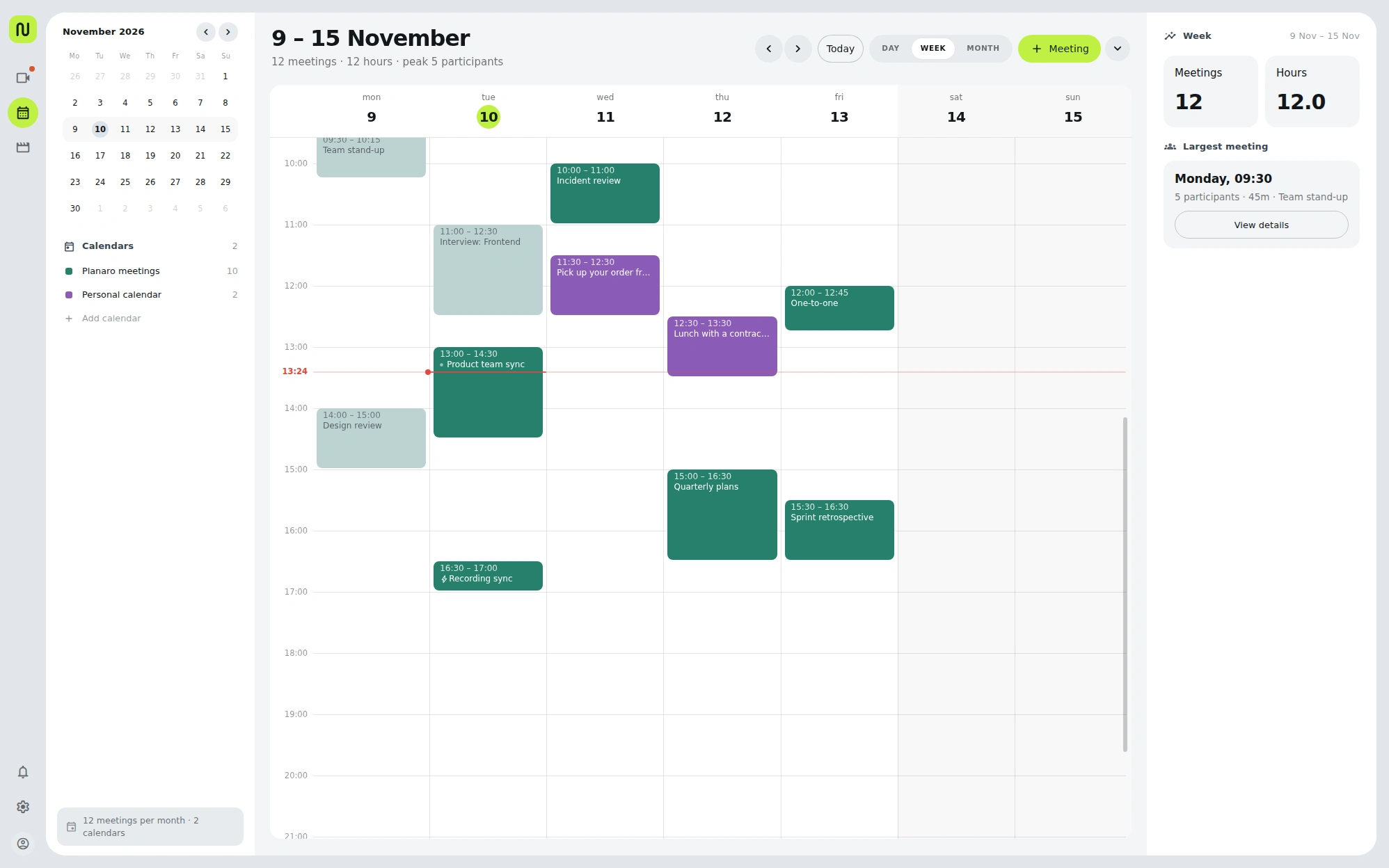
A week on the Planaro calendar with meetings and external events
Calendar features

See the whole week

Whole weekYou can see the current time, ongoing meetings and free hours.
Recurring meetings stay on scheduleMove one occurrence without changing the others.
Each source has its own colorTell imported events apart from Planaro meetings at a glance.
Join straight from the calendarThe scheduled meeting already has a room.
See your teammates’ availabilityFind an open slot without exchanging messages.
Works in the browserOn your computer and phone, without installation.
Connection

How to connect Google, Yandex or Outlook

Copy your calendar’s iCal link

In Google Calendar, look under calendar settings for the secret iCal address. Yandex Calendar and Outlook also provide calendar export or subscription links.

Paste it into Planaro

Add a calendar, paste the feed link, then choose a name and colour for its events.

Work from one calendar

Events will appear next to Planaro meetings. Updates are applied automatically; you don’t need to do anything manually.

Read only. Planaro reads events from connected calendars without editing or creating events in the source service. Add personal, work or shared feeds and give each a colour so you can see where events came from.

Learn more

Your calendar and meeting rooms, connected

A room for every meeting

Create a meeting and its room together. Select a time in Planaro Calendar to get a link you can share, then join directly from the event when it is time.

Read-only access to your external calendars

An iCal feed shares calendar events rather than account access. Planaro reads events without editing Google, Yandex or Outlook. Add several feeds and give each a colour. Subscriptions refresh automatically, usually within about fifteen minutes.

See your teammates’ availability

See meetings and availability for people in your space in one week view. For recurring meetings, edit a single occurrence or the whole series without unintentionally moving the others.

Questions

Frequently asked questions about Planaro Calendar

How is this different from a regular calendar?

Scheduling a meeting also creates its room. Join directly from the event instead of searching your messages for a link.

What calendars can I connect?

Any calendar that provides an iCal feed, including Google Calendar, Yandex Calendar and Outlook. Paste the feed link without granting access to the account itself.

Can I tell imported events apart from Planaro meetings?

Yes. Each connected calendar has a colour, making it easy to identify events from Google, Outlook or other feeds.

What happens to recurring meetings?

Move or edit one occurrence without changing the rest, or update the entire series when needed.

Can you see when your colleagues are free?

Yes. See meetings and availability for people in your space in one view to find a suitable time.

Keep exploring

Keep exploring

See your entire week

Registration takes a minute, the calendar works on the free plan.